Assigning Targets
After clicking on the Add button, you will need to assign a target format.
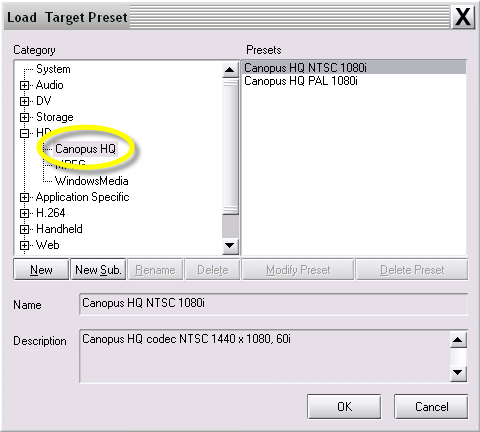
1. In the Load Target Preset window, click on a desired category on the left side.
2. Click on the (+) next to a category (if needed) to display its sub-categories. the available presets for that category are displayed on the right.
3. When you have selected a preset, you will see complete details of the format settings in the description pane located in the bottom of the Load Target Preset window.
4. You can “shift-select” or “ctrl-select” to grab multiple presets within a single category
5. Click OK to add this preset to your Target window.
Preset Target Types
System – contains base settings for all the formats ProCoder 3 produces. These settings are a good starting point for creating a custom setting.
Audio – contains PCM and MP3 settings for audio-only output formats. These settings are good for exporting audio for use in other applications and for conforming audio files.
DV – contains AVI, QuickTime and Raw DV profiles for different DV standards.
Storage – contains AVI, DivX, MPEG, or Windows Media targets for use as archival storage formats.
Handheld – contains DivX, 3GPP and RealMedia 10 for video files that are compatible with handheld devices, such as PDAs and cell phones.
HD – contains DivX, MPEG and Windows Media HD settings.
CD/DVD – contains DivX, Computer, VCD, DVD and SVCD useful for video on CD and DVD media.
Application Specific – contains Editing Software, DVD production/ authoring, Hardware, and STB profiles.
Web – contains MPEG, QuickTime, RealMedia, and Windows Media profiles suitable for Web delivery.
Image Sequence – exports a series of still images.